Adding a link/file to a message
Sometimes you will want to add files like a flyer, a designed invitation, a catalog, a link to a site on a specific topic or a lecture summary.
1. Adding a link
2. Testing the link
1. Adding a file
Adding a link
1. Mark the word/image that you would like to turn into a link
2. After Marking the word/image click on the link button( ) in the tool bar ) in the tool bar
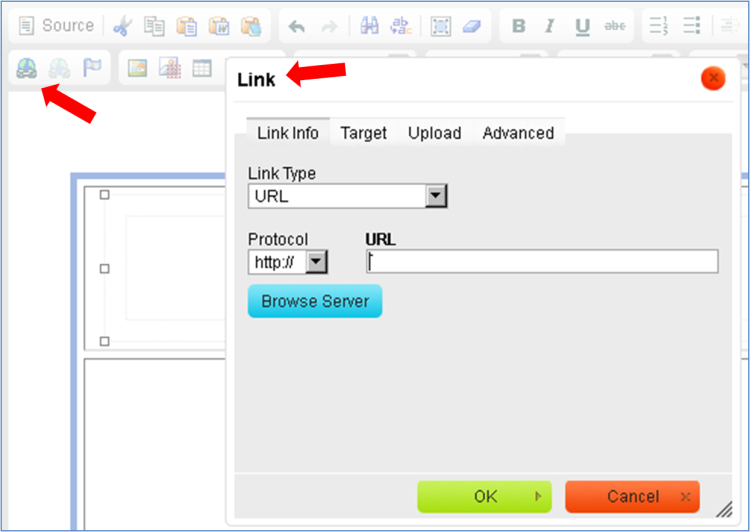
3. Enter the URL from the webpage you are referencing. (You can use copy-paste from the target page)
Testing the link
4. Go to the next step of creating a message and send a test message to your mailbox, which you can use to test the link and make sure that the link refers to the right place.
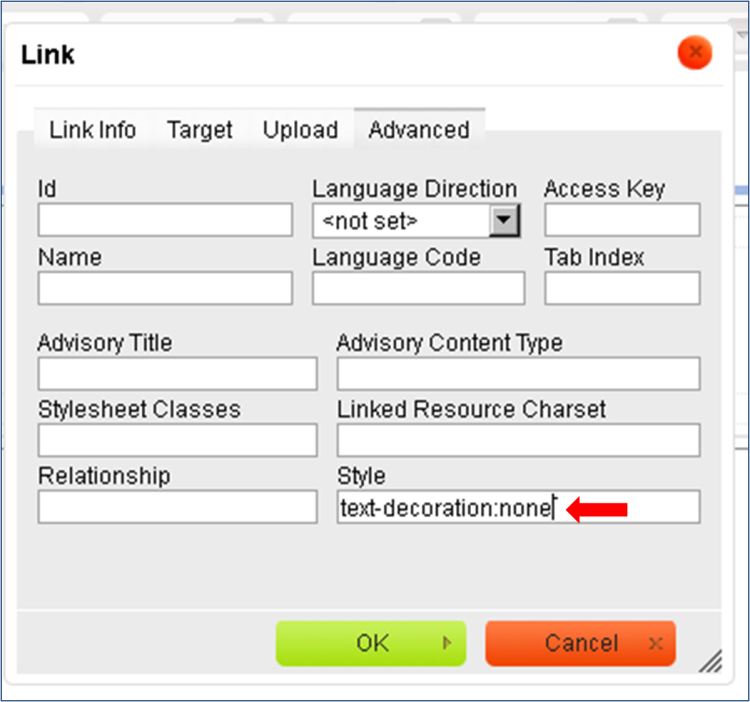
5. If you would like to remove the underline under the link, right click on the link and select "Link properties"
Then click on "advanced options".
Enter in the style box "text-decoration: none" (without spaces) and click on "ok".
Adding a file
1. Mark the word/image that you would like to turn into a link of the file.
2. lick on the "Link" button to upload files from your computer.
3. Click "Upload" and then "Choose file".
4. Select the file you want to upload and then click "Send it to the server".
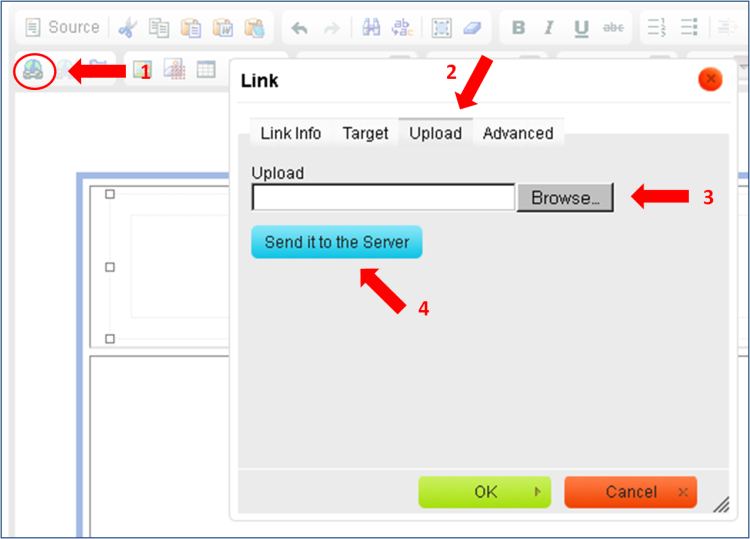
5. Now the file will be uploaded along with the rest of the information you have uploaded.
Attention-
- The maximum file size that can be uploaded is 10MB
- It is important to upload an image under an English name without spaces, otherwise e-mail providers like "Gmail' will not display the image.
- The maximum image height that can be uploaded is 1700 pixels.
- Different e-mail providers filter out background images.
- If you are using a prepared template you will have to first delete the image/text appearing in it. To upload follow steps 1-4.
- If you wish to add an image that has previously been uploaded you can click on "Browse network"
File that can be uploaded as an attachment (link)
"avi", "bmp", "csv", "doc", "docx", "flv", "gif", "jpeg", "jpg", "mid", "mov", "mp3", "mp4", "mpc", "mpeg", "mpg", "pdf", "png", "ppt", "pptx", "rar","zip", "rtf", "swf", "tar", "tif", "tiff", "txt", "wav", "wma", "wmv", "xls", "xlsx", "pps".
Image files that can be uploaded
"gif", "jpeg", "jpg", "png"
Flash files that can be uploaded
"swf", "fiv"
|